
Recommended requirements at a glance.
AVA — Computer Requirements (PDF)
Step 1
Computer Configuration
Getting the best out of the scanner starts with a PC that is fully up to date. Verify every item below ahead of time, before the practice's first scan.
Specifications for AVA
| CPU Type | Intel i7 or i9 — 14th generation, or Core Ultra 7 / Ultra 9. Minimum 24 MB of Intel Smart Cache (the processor's fast built-in memory). |
| Memory | Recommended: 32 GB RAM (DDR5 or better) Minimum: 16 GB RAM — more memory keeps scanning and case processing smooth. |
| GPU | Dedicated NVIDIA GeForce RTX graphics card (laptop or desktop, not integrated graphics). RTX 30 Series: 3070 – 3080 – 3090 RTX 40 Series: 4060 – 4070 – 4080 – 4090 RTX 50 Series: 5050 – 5060 – 5070 – 5080 – 5090 |
| Graphics Card VRAM | Minimum 8 GB of dedicated graphics memory (VRAM). Below this, the software will not start and an error message will tell you the minimum is not reached. |
| USB Type-C | USB-C port with Power Delivery (PD), marked with ⚡ next to the USB-C logo (any speed: 5, 10, 20 or 40 Gbps). Voltage 4.9 V – 5.1 V and current above 1 A. No ⚡ = data only: the port may not power the scanner. A Thunderbolt port always supports Power Delivery. |
PC Ports / Power Requirements
Check that the PC's USB-C port supports Power Delivery (PD) before buying or provisioning a computer — a USB-C port without PD can move data but will not reliably power the scanner. The port should also deliver voltage 4.9V–5.1V and current above 1A.
In 2024 the USB-IF (the industry body behind the USB-C standard) introduced a simplified logo system, so both older and newer-style logos are found on computers today. Whichever style is printed next to the port, there is only one thing to look for: the lightning bolt (⚡) next to the USB-C symbol.
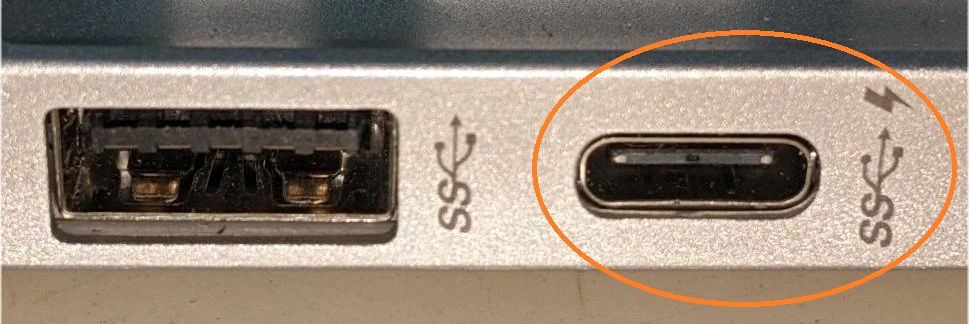
OK — Power Delivery
Lightning bolt present
Any USB-C logo that includes the lightning bolt ⚡ supports Power Delivery. On older-style logos the bolt sits after the speed marking (e.g. SS⇉⚡, 20⇉⚡); on newer-style logos it sits after the "Gbps" label (e.g. 10Gbps⚡). The speed number does not affect charging — only the bolt does.
NOT OK — Data Only
No lightning bolt
A USB-C logo with a speed marking but no lightning bolt (e.g. SS⇉ or 20Gbps alone) transfers data only. The scanner will still connect, but the port may not deliver stable power — avoid these ports for the scanner, or add a powered dock.
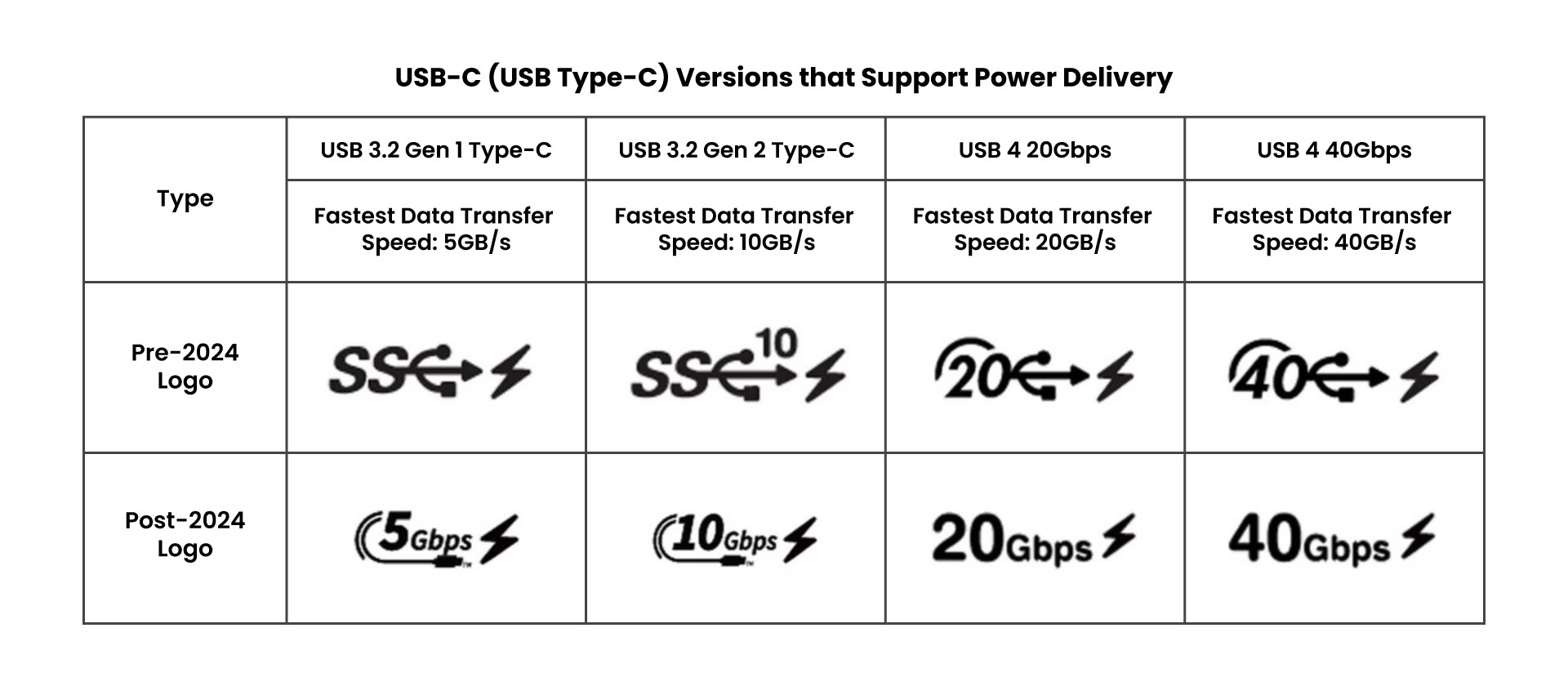
Official USB-IF logo reference — any version, old or new, works as long as the lightning bolt is present.
Tip: a Thunderbolt port (marked with the Thunderbolt icon) always supports Power Delivery — no need to check further.
Windows & Driver Updates
Complete all updates on the computer in advance:
- All major Windows updates installed
- NVIDIA graphics card driver updated
- Reboot after each update
- Non-critical apps removed from Startup Apps
Microsoft ships a major Windows 11 feature update roughly once a year — the current one is version 25H2 (released September 2025), followed by monthly cumulative updates (most recently the August 2026 update). Some customers report scanning slowness in the days right after a major update — while it is pending or has just completed, it temporarily slows PC performance. Let the update finish fully before scanning; it can take up to 20 minutes.
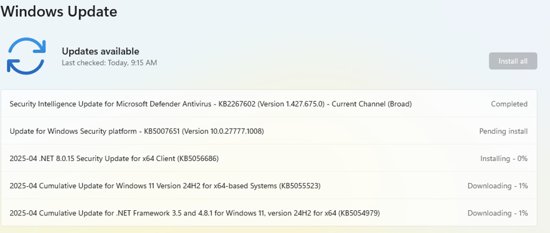
Recommended
Daily Habits
- Leave the computer online a few hours per night so updates apply as needed
- Restart the PC on a daily basis
- Make sure there are no games installed on the computer